Authenticator App - Official ™
Publisher Description
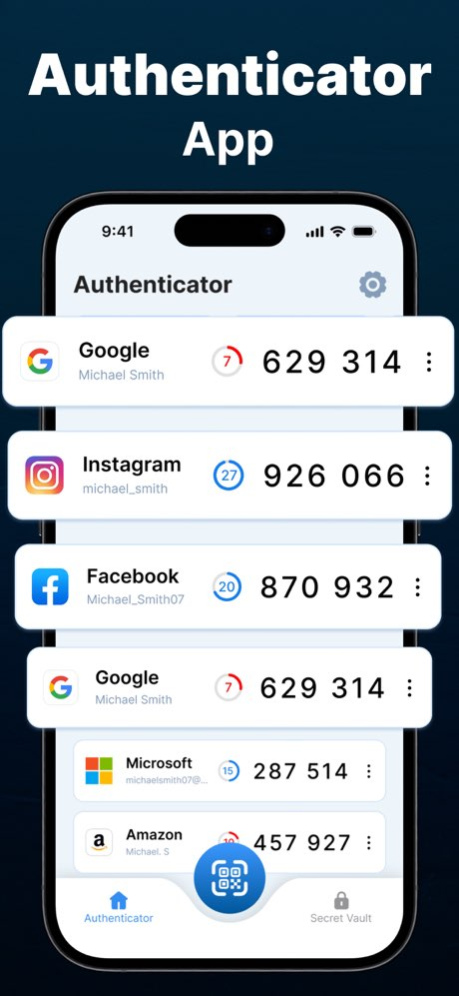


Authenticator App is the ultimate 2FA (Two-Factor Authentication) solution for you, ensuring an extra layer of security to protect your sensitive data. Whether you’re securing your email, banking apps, social media, or work accounts, our powerful Authenticator provides the best MFA (Multi-Factor Authentication) experience for iPhone users.
Why Choose Our Authenticator App?
Seamless 2FA & MFA Protection: Strengthen your online security by adding an extra verification step for your logins. With our Authenticator App, hackers can’t access your accounts even if they steal your password.
One-Tap Authentication: Easily generate Time-Based One-Time Passwords (TOTP) for quick and secure logins.
Offline Authentication: No internet? No problem! Our Authenticator App works offline, allowing you to retrieve codes anytime, anywhere.
Secure Cloud Backup: Never lose access to your accounts! Securely store your authentication codes with encrypted cloud backup.
QR Code Scanner: Quickly add new accounts by scanning QR codes from supported websites and apps.
Premium features:
Free app users can add limited auth codes and accounts while premium subscription app users will get access to all unlimited features including adding unlimited accounts.
How Our Authenticator App Works?
Enable 2FA on Your Accounts: Activate Two-Factor Authentication (2FA) on your email, social media, banking, or any supported account.
Scan QR Code: Use our built-in scanner to quickly add your account to the Authenticator App.
Generate Secure Codes: Get a unique TOTP (Time-Based One-Time Password) every few seconds.
Login Securely: Enter the generated Auth code during login for an additional layer of security.
Our Authenticator App supports major services like: Google Authenticator, Facebook, Instagram, Salesforce Authenticator, Twitter, LinkedIn, Snapchat, Microsoft Authenticator.
Who Needs an Authenticator App?
Individuals: Secure your personal online accounts with strong 2FA authentication.
Encrypted Cloud Backup: Restore your authentication codes if you switch devices.
Device Encryption: Your Auth codes are stored securely using industry-leading encryption.
Multiple Token Formats: Supports TOTP, HOTP, and SHA-1, SHA-256, SHA-512 algorithms for maximum compatibility.
Easy Migration & Backup
Moving to a new iPhone? Our Authenticator App makes transferring accounts simple and hassle-free with secure cloud backup and one-tap restore functionality.
Simple, Fast, and Secure 2FA Authentication
Whether you need a Two-Factor Authentication (2FA) App for personal use, work, or high-security applications, our Authenticator is the ultimate solution. Say goodbye to security threats and safeguard your digital world with the best MFA Authenticator App for iPhone!
Download the Best Authenticator App Today!
Don’t wait until it’s too late! Protect your online identity, secure your accounts, and enjoy hassle-free 2FA authentication with the most powerful Authenticator App on the App Store. Download now and experience the best in Two-Factor Authentication (2FA) and Multi-Factor Authentication (MFA) security!
QR Reader App's Subscription Terms
- Subscriptions with a free trial will automatically convert to a paid subscription.
- Payment will be deducted from your iTunes Account upon purchase confirmation.
- Subscriptions automatically renew unless auto-renewal is disabled 24 hours prior to the current period's end.
- Users can manage subscriptions and turn off auto-renewal in Account Settings post-purchase.
To avoid charges, cancel a free trial or subscription by disabling auto-renewal in iTunes account settings at least 24 hours before the trial or subscription ends. The cancellation will activate the day after the current subscription period ends, reverting to the free service.
Privacy Policy and Terms of Use of QR Scanner App:
Privacy Policy: https://tripleit.ltd/app-privacy-policy.html
Terms of Use: https://tripleit.ltd/app-eula.html
About Authenticator App - Official ™
The company that develops Authenticator App - Official ™ is TRIPLE IT LTD. The latest version released by its developer is 1.0 .
To install Authenticator App - Official ™ on your iOS device, just click the green Continue To App button above to start the installation process. The app is listed on our website since 2026-10-07 and was downloaded 0 times. We have already checked if the download link is safe, however for your own protection we recommend that you scan the downloaded app with your antivirus. Your antivirus may detect the Authenticator App - Official ™ as malware if the download link is broken.
How to install Authenticator App - Official ™ on your iOS device:
- Click on the Continue To App button on our website. This will redirect you to the App Store.
- Once the Authenticator App - Official ™ is shown in the iTunes listing of your iOS device, you can start its download and installation. Tap on the GET button to the right of the app to start downloading it.
- If you are not logged-in the iOS appstore app, you'll be prompted for your your Apple ID and/or password.
- After Authenticator App - Official ™ is downloaded, you'll see an INSTALL button to the right. Tap on it to start the actual installation of the iOS app.
- Once installation is finished you can tap on the OPEN button to start it. Its icon will also be added to your device home screen.
